---
title: Enabling and Disabling Minor Ailment Conditions
description: Learn how to manage Minor Ailment service settings within the MedEssist platform. This guide walks you through customizing the Minor Ailment conditions your pharmacy can assess and prescribe for.
---
[Skip to content](https://help.medessist.com/enabling-and-disabling-minor-ailment-conditions#main-content)
[](https://help.medessist.com?hsLang=en)
Open main navigation
Close main navigation
- [Launch MedEssist](https://app.medessist.com/)
[Launch MedEssist](https://app.medessist.com/)
How can we help you?
- There are no suggestions because the search field is empty.
1. [MedEssist Help](https://help.medessist.com/?hsLang=en)
2. [Clinical Tools](https://help.medessist.com/clinical-tools?hsLang=en)
3. [Minor Ailments and Prescribing](https://help.medessist.com/clinical-tools?hsLang=en#minor-ailments-and-prescribing)
# Enabling and Disabling Minor Ailment Conditions
## Learn how to manage Minor Ailment service settings within the MedEssist platform. This guide walks you through customizing the Minor Ailment conditions your pharmacy can assess and prescribe for.

1\. Open '**Settings**' from the bottom-left menu
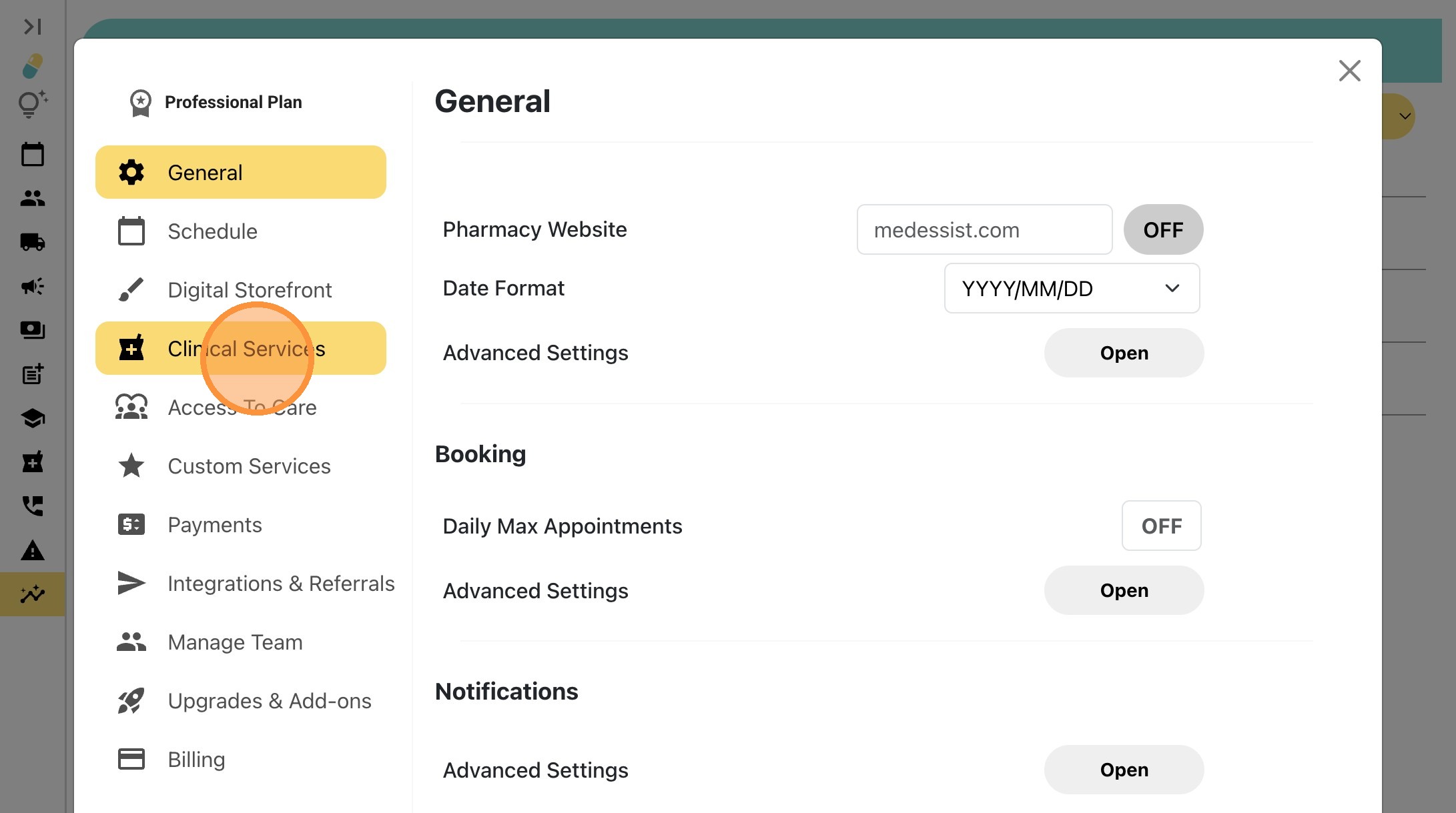
2\. Select '**Clinical Services**' from the left sidebar menu
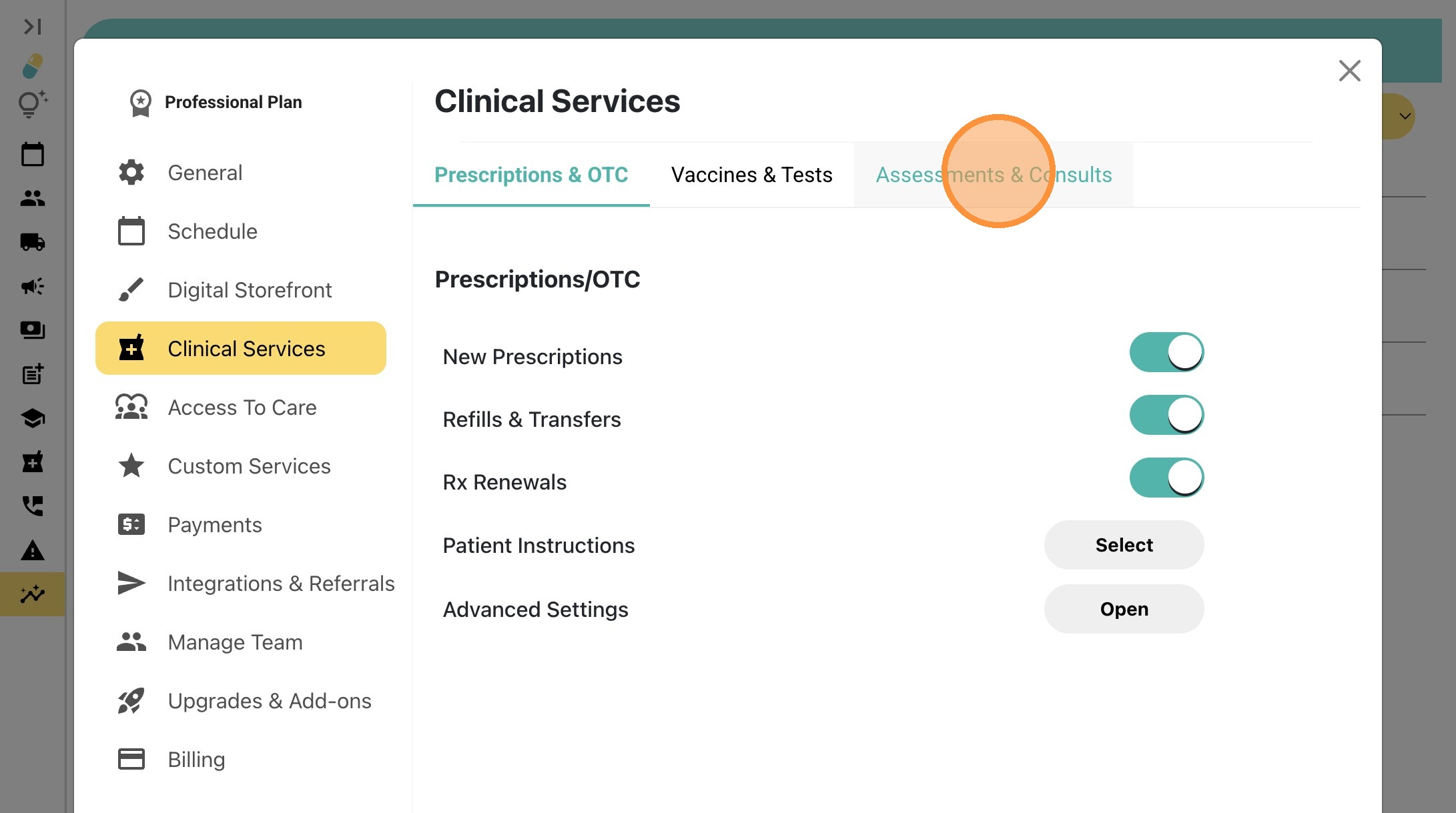
3\. Click the '**Assessments & Consults**' tab
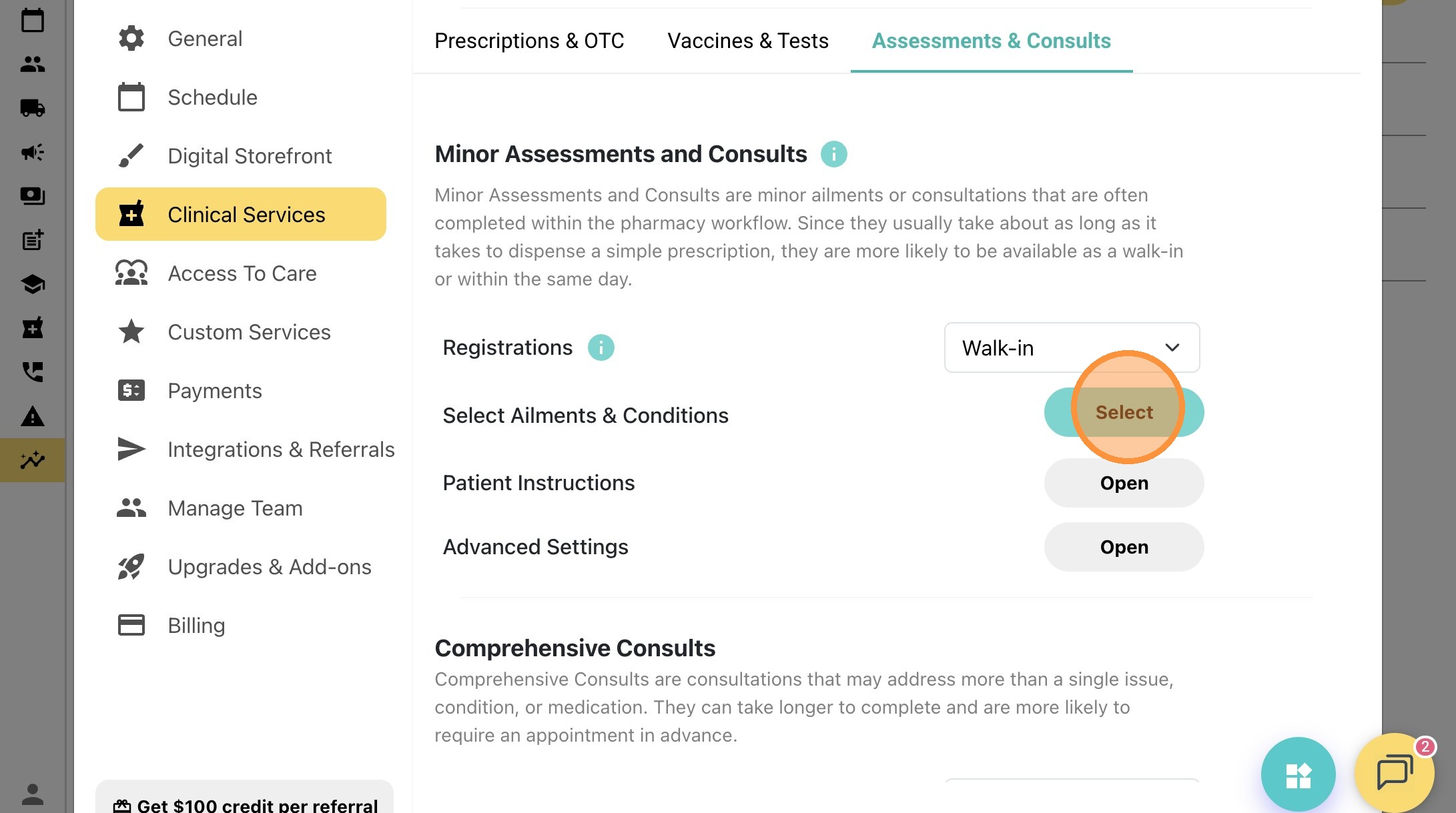
4\. Click '**Select**' to open **Ailments & Conditions** settings
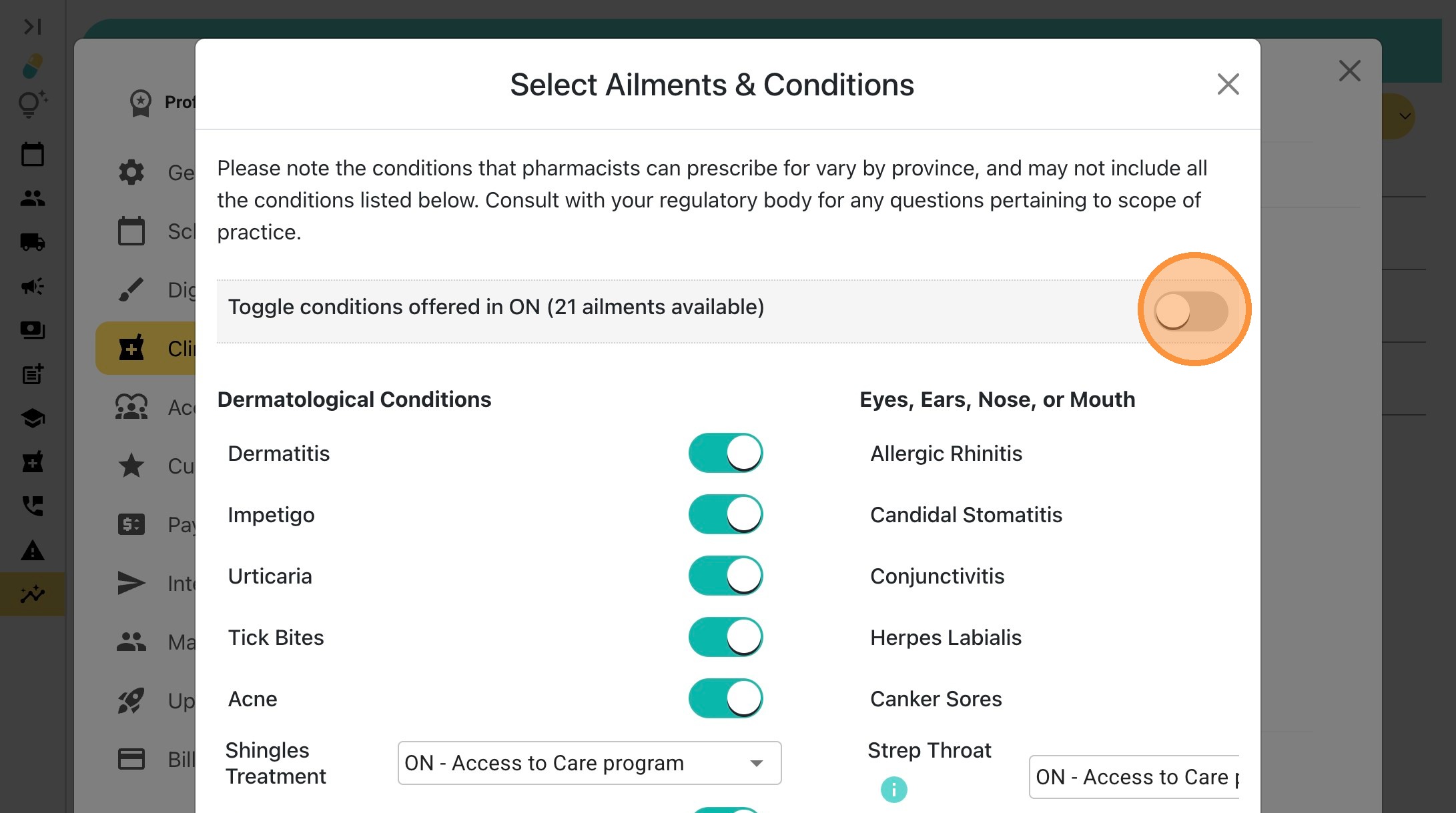
5\. Enable '**Toggle conditions offered in \[Your Province\]**' if you’d like your pharmacy to offer all available minor ailment conditions in your region.
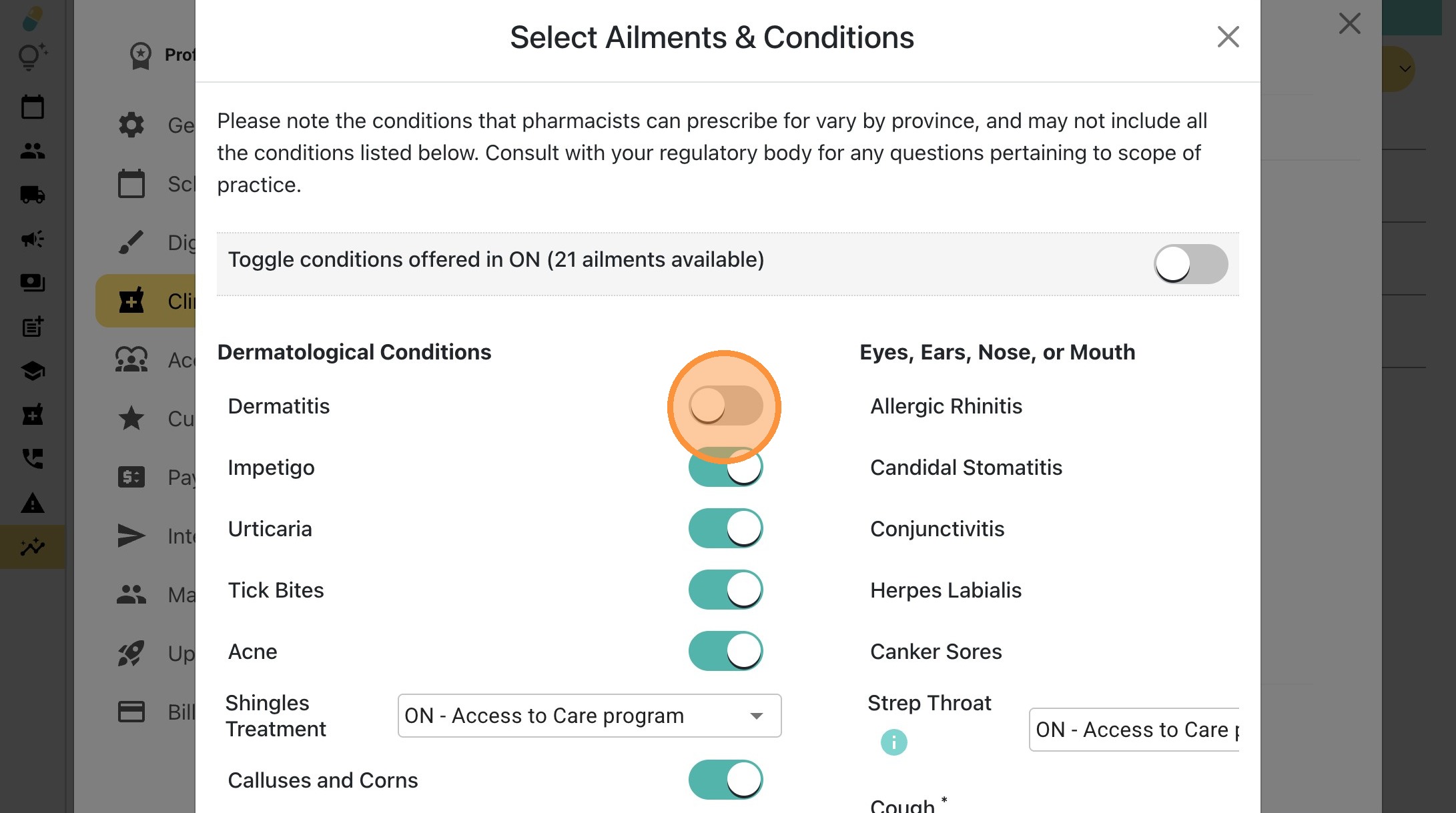
6\. Or, toggle any specific conditions on or off individually based on your pharmacy’s preferences.
- [Pharmacy Set-Up Guide](https://help.medessist.com/pharmacy-set-up-guide?hsLang=en)
- [Clinical Tools](https://help.medessist.com/clinical-tools?hsLang=en#main-content)
- [Minor Ailments and Prescribing](https://help.medessist.com/clinical-tools?hsLang=en#minor-ailments-and-prescribing)
- [Vaccines](https://help.medessist.com/clinical-tools?hsLang=en#vaccines)
- [Smart Forms](https://help.medessist.com/clinical-tools?hsLang=en#smart-forms)
- [Consultations and Assessments](https://help.medessist.com/clinical-tools?hsLang=en#consultations-and-assessments)
- [MedEssist Deliveries](https://help.medessist.com/medessist-deliveries?hsLang=en)
- [Incident Reporting](https://help.medessist.com/incident-reporting?hsLang=en#main-content)
- [Getting Started](https://help.medessist.com/incident-reporting?hsLang=en#getting-started)
- [FAQs](https://help.medessist.com/incident-reporting?hsLang=en#faqs)
- [Digital Storefront](https://help.medessist.com/digital-storefront?hsLang=en#main-content)
- [Branding](https://help.medessist.com/digital-storefront?hsLang=en#branding)
- [Adding and Editing Content](https://help.medessist.com/digital-storefront?hsLang=en#adding-and-editing-content)
- [Schedule & Appointments](https://help.medessist.com/schedule-appointments?hsLang=en#main-content)
- [Custom Services](https://help.medessist.com/schedule-appointments?hsLang=en#custom-services)
- [Communication Tools](https://help.medessist.com/communication-tools?hsLang=en)
- [Pharmacy and Account Settings](https://help.medessist.com/pharmacy-and-account-settings?hsLang=en)
- [Access to Care](https://help.medessist.com/access-to-care?hsLang=en#main-content)
- [FAQs](https://help.medessist.com/access-to-care?hsLang=en#faqs)
- [Marketing Tools](https://help.medessist.com/marketing-tools?hsLang=en)
- [Integrations](https://help.medessist.com/integrations?hsLang=en)
- [Lumi AI](https://help.medessist.com/lumi-ai?hsLang=en)
[](http://www.medessist.com)
[mailto:support@medessist.com](mailto:support@medessist.com)
Copyright © 2025, MedEssist